Monaro Panthers – Season 2026 Player Registration
All new and returning players must self register for the 2026 season.
We look forward to having you play with us this year. 💚🖤⚽
Registration Overview - Please Read Carefully
Registration is completed in two stages.
⚠️Both stages are required.⚠️
⚠️If a player has not completed both stages they will be deemed ineligible to play.⚠️
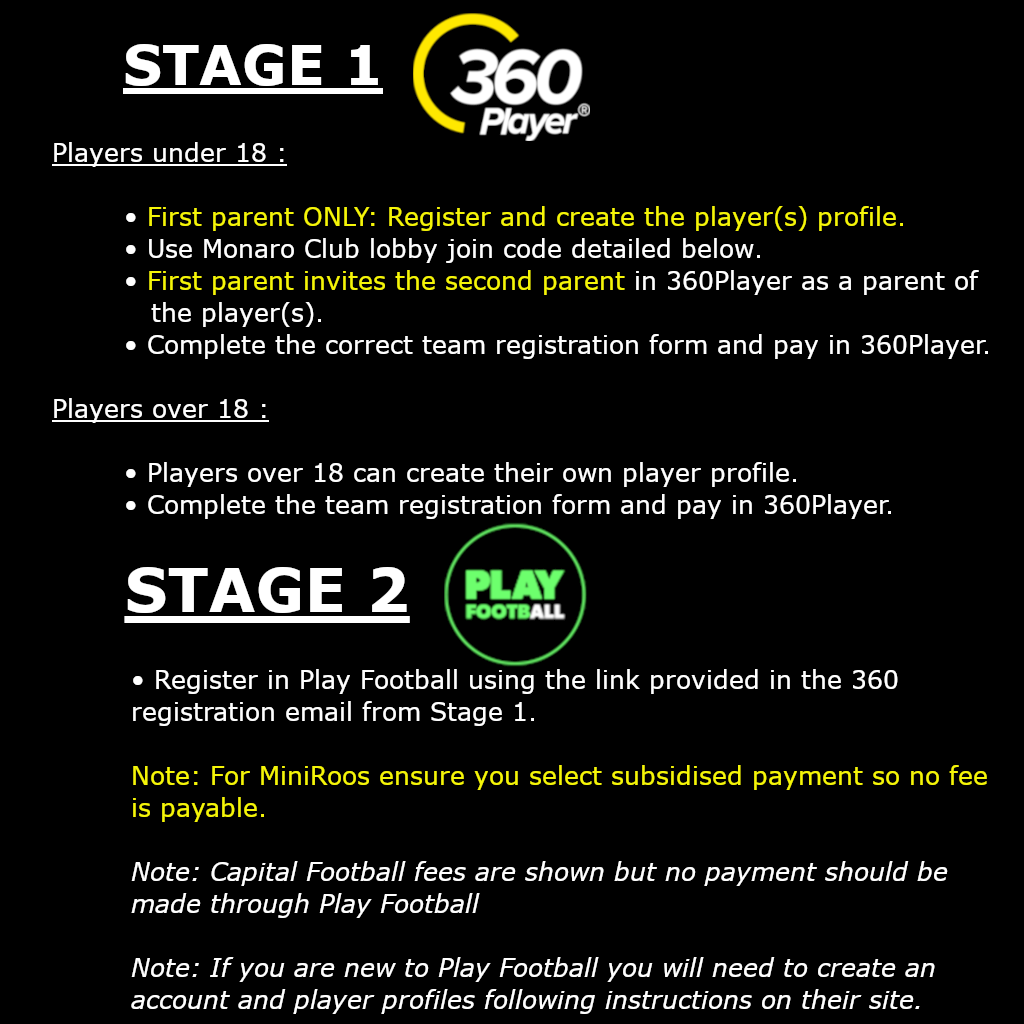
Stage 1 – 360Player Registration & Payment
Step 1 – Join Monaro Panthers in the 360Player App
Monaro Panthers use 360Player for team management and club communication.
Important updates such as training times and season information will be sent through the app, so notifications must be enabled.
Important note:
If you are already registered with another club in 360Player, the application fully supports being connected to multiple clubs. Please see 360Player FAQ at the bottom of the page for information or options if this applies to you.
Download the app or use a web browser:

Join the Monaro Panthers Club Lobby using the code below:
K7KAKB
Players aged 18+
Players over 18 can register themselves in the app.
Select Player as the role.
Help guide:
https://help.360player.com/en/articles/10153768-how-to-create-a-360player-account
Players aged under 18
Overview:
⚠️Each minor player must be linked in the 360Player app to a parent/guardian for welfare and protection reasons.
⚠️First parent ONLY: Register and create the player(s) profile.
⚠️First parent invites the second parent to join 360Player as a parent of the player(s).
⚠️CRITICAL: DO NOT CREATE MULTIPLE PLAYER PROFILES FOR THE SAME PLAYER
First PARENT ONLY
In the 360Player app the first parent or guardians must:
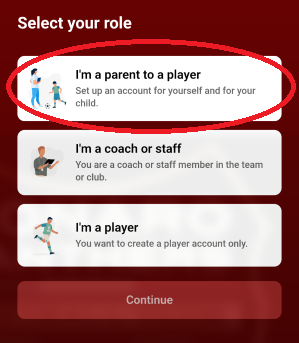
Create a Parent account. Select Parent role (do not select Player)
Note: if a parent is a Coach/Team Manager with children in the Club select Coach/Staff role instead of parent
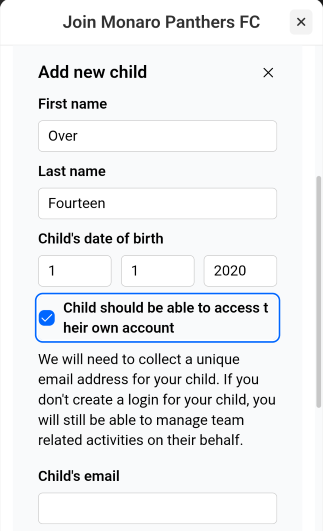
For Players aged 14-18
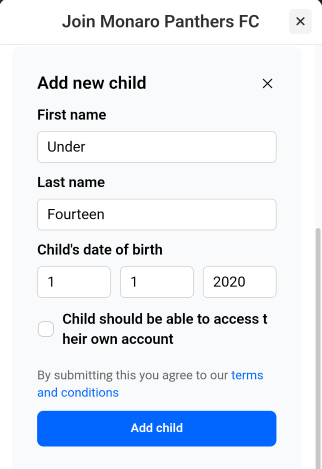
First parent creates a player profile for each child
Tick Child should be able to access their own account
Create individual login credentials for each child and provide to your child so they can access the 360Player app
Note: Both the child and parents can respond to team wall posts and respond to team events.
For Players under 14
First parent creates a player profile for each child
Do not create login credentials for the child
Note: This means the parents communicate and respond to team events on behalf of the child
First PARENT INVITES SECOND PARENT
In the 360Player app the first parent or guardian then invite the second parent or guardian:
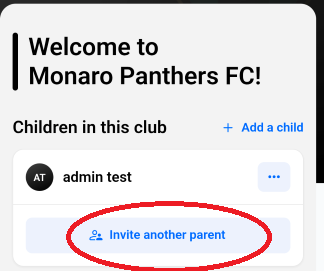
Help guide for inviting the second parent:
https://help.360player.com/en/articles/10192280-connect-an-additional-parent-or-guardian-to-a-player
Step 2 – Complete the 360player Registration Form FOR THE PLAYER(s)
Important notes:
Please ensure you know which team you are registering for
The vast majority of Monaro Panthers players would be registering in the community teams. NPL, SAP and Pathway teams are invite only with players having been selected via a trial/selection process.
In the app:
Go to Club Lobby in 360Player
Select Registrations
Please ensure you select the correct registration team form for the player.
Complete one form per player.
If the player has previously played football (at Monaro Panthers or another club), please include the FFA number.
TIP: If you can’t find your existing FFA number, it can be located via the Play Football website.
Step 3 – Make Payment
Payment is made securely through the 360Player form using a credit or debit card.
The registration fee covers:
Player kit
Coach and manager registrations
Team nomination fees
Referee fees
Ground hire and lighting
Line marking
Training and match equipment
FFA fee, Capital Football fee, MPFC charges and GST
In some instances, the fees charged may differ for certain groups due to age-based fees imposed by FFA & Capital Football.
Monaro Panthers FC is a not-for-profit club predominantly run by volunteers.
Stage 2 – Play Football Registration
After completing Stage 1, all players must also be registered in Play Football to be registered in Capital Footballs systems.
⚠️CRITICAL: Without completion of the Play Football registration, players will be deemed ineligible to play.⚠️
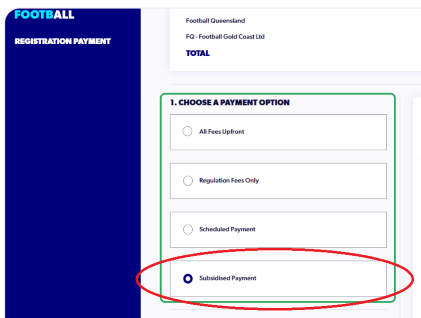
⚠️CRITICAL: FOR MINIROOS Ensure you select the subsidised payment option so that no fee is payable ⚠️
Play Football FAQ - MiniRoos Subsidised Payment
Important notes:
No payment is made in Play Football. The Capital Football fee structure is visible for each team.
The email will be sent from 360 Player containing the Play Football team registration link.
Please ensure you select the correct package in Play Football for the team you have registered against.
Step 1 – Register in Play Football
Log in or create an account (if not already registered previously):

Register the player using the Play Football team registration link provided in the email received from your 360Player registration.
Final Stage - Confirm Your Registration
You should receive separate confirmation emails from both:
Monaro Panthers 360Player and;
Play Football
If you experience any issues, contact your club coordinator.
Follow our Facebook page and the 360Player app for updates.
Welcome to Monaro Panthers!
🖤💚Forza Monaro! 💚🖤
Problems Registering and Need Help?
Play Football Support
Help site:
https://support.playfootball.com.au/support/home
Email: support@playfootball.com.au
Phone: 02 8880 7983
PLAY FOOTBALL FAQ
FOR MINIROOS WHY IS PLAY FOOTBALL SHOWING THAT A FEE IS PAYABLE?
For MiniRoos registration ensure you select the subsidised payment option so no fee is payable to Play Football.
360Player Support
Help site:
https://help.360player.com/en/
360PLAYER FAQ
WHAT IF I’M a COACH or MANAGER AND ALSO PARENT OF A PLAYER?
If you are a manager or a coach with a child in the club this applies to you:
Register as Coach or Staff first selecting Coach/Staff as role.
Then add your children following the normal process detailed above for the players age.
What If I have an existing 360Player Account OR MY CHILD IS ALREADY REGISTERed in 360 with another club?
If you have an existing 360Player Account connected to another club you have a few options:
Option 1 - Join the Monaro 360Player instance and remain in both clubs. The 360Player app fully supports switching between clubs by tapping the club logo in the app. This might be a requirement if you play summer sixes with another club that uses 360Player.
Option 2 - If you want to be removed from your previous club's 360Player instance, you'll need to contact the club and ask them to remove you from the Clubs 360Player instance. Results may vary.
Option 3 - Delete your existing 360Player account with the previous club and register a new account with Monaro 360Player if you prefer.
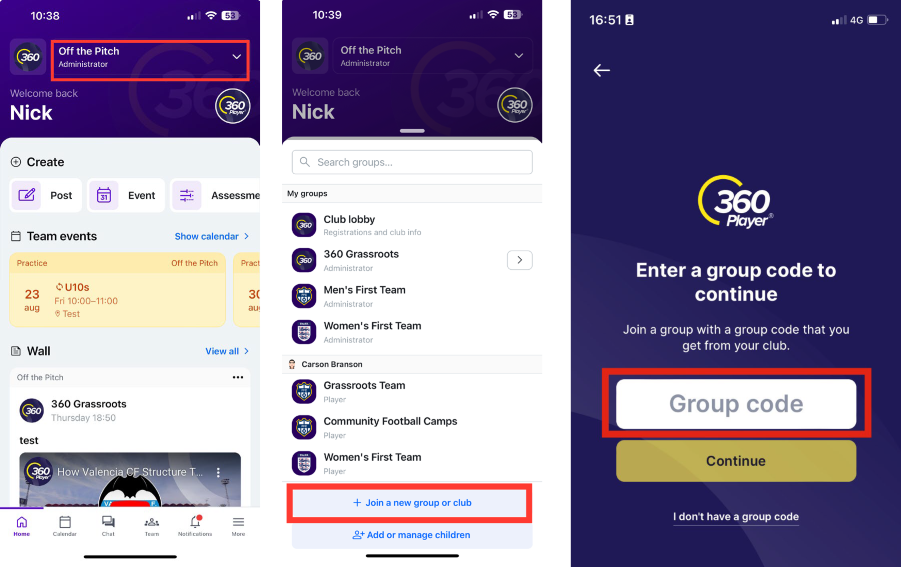
PROCESS FOR EXISTING 360PLAYER USER PLAYER OR PARENT JOINING A NEW GROUP OF CLUB:
Log into 360Player using existing account
Select the dropdown arrow at the top of the screen
Select “Join a new group or club”
Select the player or child that is joining Monaro 360Player
Enter the Lobby group code detailed above.